
The Military Engineering Services (MES) has officially released the Call Letters for the Screening Test specifically for the Lower Division Clerk (LDC – BPS-11) positions. Candidates who have successfully deposited their examination fee can now access the online job portal to retrieve their roll numbers and call letters.
With 91 total vacancies announced across the country, competition is going to be intense. This guide breaks down the eligibility quotas, exam patterns, mandatory prerequisites, and step-by-step instructions to download your test slip.
MES LDC (BPS-11) Job Statistics & Quota Distribution
The department has opened up seats distributed transparently across federal and provincial quotas to ensure equal employment representation.
| Category / Province | Open Merit Seats | Women Quota | Non-Muslim Quota |
| All Pakistan Merit | 7 | — | — |
| Punjab | 38 | 4 | 2 |
| Sindh (Urban) | 6 | 1 | — |
| Sindh (Rural) | 9 | 1 | — |
| Khyber Pakhtunkhwa (KPK) | 9 | 1 | — |
| Balochistan | 5 | 1 | — |
| FATA | 2 | — | — |
| Gilgit-Baltistan (GB) | 1 | — | 1 |
| Azad Kashmir (AK) | 1 | — | — |
| Disabled Quota | 2 | — | — |
| Total Seats | 91 Vacancies |
Also Read More About: MES Employees Facilities: Free Accommodation and Medical Benefits
Eligibility Criteria & Mandatory Requirements
Securing a final appointment as an LDC goes beyond just passing the initial screening test. The structural requirements for candidates are detailed below:
- Age Limit: 18 to 30 Years.
- Basic Qualification: Matriculation (Matric).
- Technical Skill: A minimum professional typing speed of 30 words per minute (w.p.m) is compulsory.
- Preferred Skills: Candidates possessing adequate hands-on knowledge of MS Office applications will receive preference during final selection panels.
- Post-Selection Requirement: Once selected, all candidates must undergo a mandatory 3-weeks basic IT Training course (including MS Office modules) conducted officially by the National Information Technology Board (NITB) before the formal completion of their probation period.
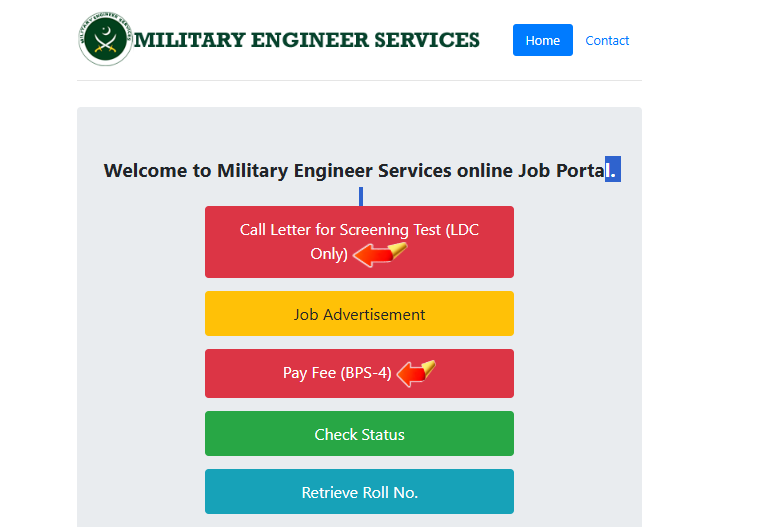
How to Download Your MES LDC Screening Test Call Letter
Follow these straightforward steps on the portal to secure your screening slip:
- Navigate directly to the official job portal at jobs.mes.gov.pk.
- On the homepage interface, click on the prominent red button labeled “Call Letter for Screening Test (LDC Only)”.
- Provide your valid CNIC number and your unique Tracking Roll Number received via SMS.
- Verify your payment verification status on screen.
- Click on Print/Download to save your physical slip.
⚠️ Important Reminder: Ensure you carry a crisp, printed copy of this call letter alongside your original CNIC to the examination center. Candidates without verified call slips will be denied entry at the gateway.
Also Read More About: MES LDC Screening Test Pattern & Preparation Guide
Best of luck with your test preparation! Ensure you brush up on basic IT concepts, general knowledge, and your typing speed to secure your spot among the 91 selected clerks.


